반응형
Tomcat 4.1이 나오는 둥 엄청나게 오래된 내용인데 이전 블로그에서 복사해 왔다.
javax.Servlet 환경 설정
- $TOMCAT_HOME/common/lib/servlet.jar 파일을 복사합니다.
- $JAVA_HOME/jre/lib/ext 폴더 안에 넣어줍니다.
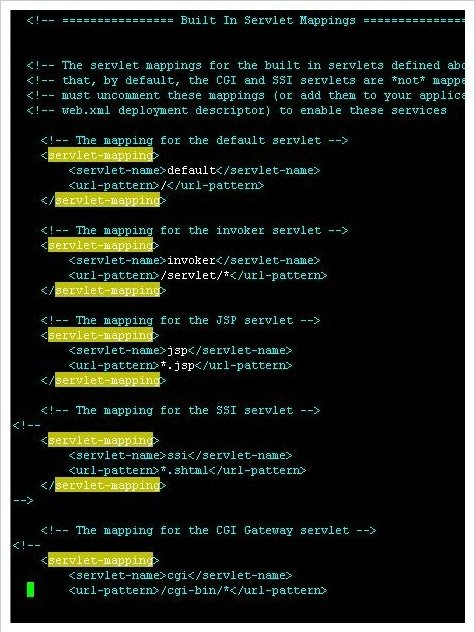
- $TOMCAT_HOME/conf 폴더로 가셔서 web.xml 파일을 열어줍니다.
- 사용하고자 하는 스크립트 형식의 주석처리되어 있는 부분을 지워줍니다.
MIME-Type
| MIME-Type | Description | File Extension |
| application/acad | AutoCAD drawing files | dwg |
| application/clariscad | ClarisCAD files | ccad |
| application/dxf | DXF (AutoCAD) | dxf |
| application/msaccess | Microsoft Access file | mdb |
| application/msword | Microsoft Word file | doc |
| application/octet-stream | Uninterpreted binary | bin |
| application/pdf | PDF (Adobe Acrobat) | |
| application/postscript | PostScript, encapsulated PostScript, Adobe Illustrator |
ai, ps, eps |
| application/rtf | Rich Text Format file | rtf rtf |
| application/vnd.ms-excel | Microsoft Excel file | xls |
| application/vnd.ms-powerpoint | Microsoft PowerPoint file | ppt |
| application/x-cdf | Channel Definition Format file | cdf |
| application/x-csh | C-shell script | csh csh |
| application/x-dvi | TeX | dvi dvi dvi |
| application/x-javascript | JavaScript source file | js |
| application/x-latex | LaTeX source file | latex |
| application/x-mif | FrameMaker MIF format | mif |
| application/x-msexcel | Microsoft Excel file | xls |
| application/x-mspowerpoint | Microsoft PowerPoint file | ppt |
| application/x-tcl | TCL script | tcl |
| application/x-tex | TeX source file | tex |
| application/x-texinfo | Texinfo (emacs) | texinfo, texi |
| application/x-troff | troff file | t, tr, roff t, tr, roff |
| application/x-troff-man | troff with MAN macros | man |
| application/x-troff-me | troff with ME macros | me |
| application/x-troff-ms | troff with MS macros | ms |
| application/x-wais-source | WAIS source file | src |
| application/zip | ZIP archive | zip |
| audio/basic | Basic audio (usually m-law) | au, snd |
| audio/x-aiff | AIFF audio | aif, aiff, aifc |
| audio/x-wav | Windows WAVE audio | wav |
| image/gif | GIF image | gif |
| image/ief | Image Exchange Format file | ief |
| image/jpeg | JPEG image | jpeg, jpg jpe |
| image/tiff | TIFF image | tiff, tif |
| image/x-cmu-raster | CMU Raster image | ras |
| image/x-portable-anymap | PBM Anymap image format | pnm |
| image/x-portable-bitmap | PBM Bitmap image format | pbm |
| image/x-portable-graymap | PBM Graymap image format | pgm |
| image/x-portable-pixmap | PBM Pixmap image format | ppm |
| image/x-rgb | RGB image format | rgb |
| image/x-xbitmap | X Bitmap image | xbm |
| image/x-xpixmap | X Pixmap image | xpm |
| image/x-xwindowdump | X Windows Dump (xwd) | xwd |
| multipart/x-gzip | GNU ZIP archive | gzip |
| multipart/x-zip | PKZIP archive | zip |
| text/css | Cascading style sheet | css |
| text/html | HTML file | html, htm |
| text/plain | Plain text | txt |
| text/richtext | MIME Rich Text | rtx |
| text/tab-separated- values | Text with tab-separated values | tsv |
| text/xml | XML document | xml |
| text/x-setext | Struct-Enhanced text | etx |
| text/xsl | XSL style sheet | xsl |
| video/mpeg | MPEG video | mpeg, mpg, mpe |
| video/quicktime | QuickTime video | qt, mov |
| video/x-msvideo | Microsoft Windows video | avi |
| video/x-sgi-movie | SGI movie player format | movie |
한글 업로드 처리 - ClueRequestFilter
톰캣 4.1을 설치하고 나서 URL인코딩이 안돼서 첨부된 파일을 TOMCAT_HOME/common/lib 안에 복사한 뒤
TOMCAT_HOME/cont/web.xml 파일을 수정해서 해결했다.
<?xml version="1.0" encoding="ISO-8859-1"?>
<!DOCTYPE web-app
PUBLIC "-//Sun Microsystems, Inc.//DTD Web Application 2.3//EN" "http://java.sun.com/dtd/web-app_2_3.dtd">
<web-app>
<display-name></display-name>
<description>
</description>
<filter>
<filter-name>clueRequestFilter</filter-name>
<filter-class>kr.co.cluecom.filters.tomcat4.ClueTC4RequestFilter
</filter-class>
<init-param>
<param-name>encoding</param-name>
<param-value>EUC-KR</param-value>
</init-param>
<init-param>
<param-name>debug</param-name>
<param-value>0</param-value>
</init-param>
</filter>

<filter-mapping>
<filter-name>clueRequestFilter</filter-name>
<url-pattern>/*</url-pattern>
</filter-mapping>

<error-page>
<error-code>500</error-code>
<location>/error_page.jsp</location>
</error-page>
</web-app>
* 맨 마지막에 error-page는 보너스
반응형
'개발 기록 > OS & Server' 카테고리의 다른 글
| [Apache 1.3] server-status (0) | 2023.05.22 |
|---|---|
| vi 편집기 명령어 - 리눅스/유닉스 (0) | 2023.05.18 |
| [Tomcat] JVM 메모리 늘리기 (0) | 2023.05.12 |
| 솔라리스 서버관리 명령어 모음 (0) | 2022.01.15 |
| stty - Invalid argument 에러 (0) | 2022.01.15 |